How to Set Up E-Invoice Information
- Setup E-Invoicing Information in Popcorn Backend Website (www.popcorncashier.com)
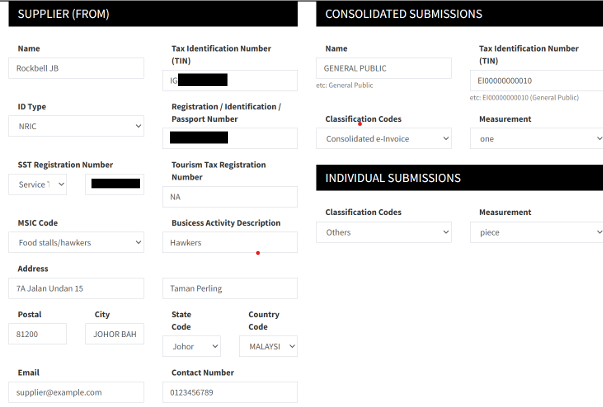
1) If you don’t have an SST Registration Number or Tourism Tax Registration Number, please write "NA".
2) Phone number format should not include any symbols.
3) For the Consolidated Submissions section, please follow the example in the photo above for “Name”, “Tax Identification Number (TIN)”, “Classification Code”, and “Measurement”.
4) For the Individual Submissions section, please follow the photo above for “Classification Codes” and “Measurement”.
Still stuck?
Our team is happy to walk you through this step by step.
