How to Change Service Charge Setting for Malaysia & Singapore
- Go to Popcorn Website (www.popcorncashier.com)

>Store & Outlet > Outlet List
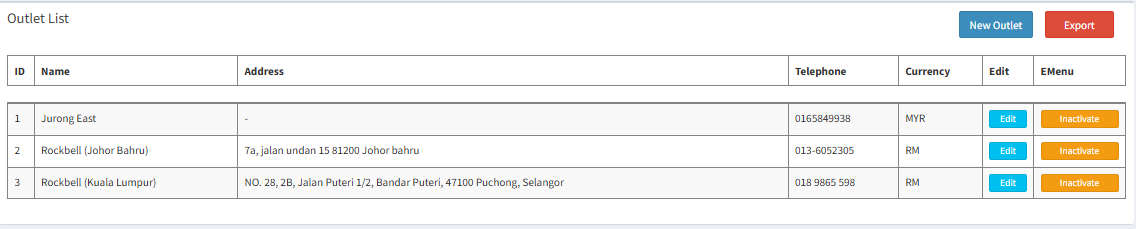
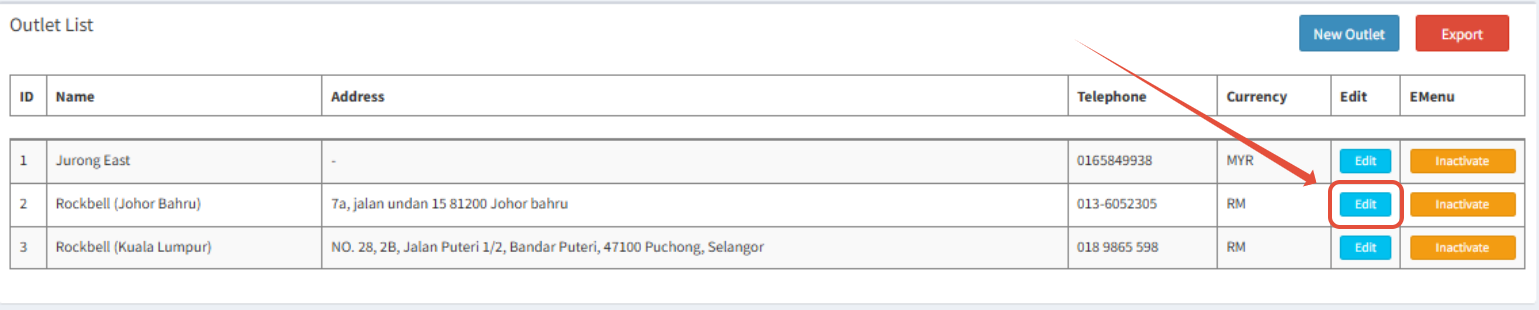
- Choose the Outlet you want to change and click Edit
- Scroll down and find Tax & Service Charge
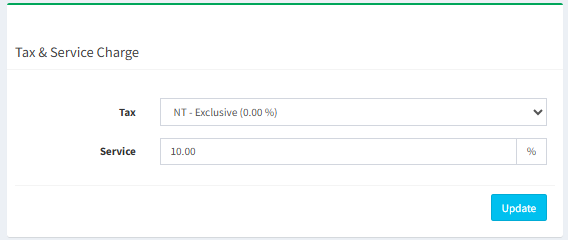
- Malaysia: SST is calculated before service charge.
- SST is calculated on the food price only (before service charge).
Example:
Food: RM100
Service Charge (10%): RM10
SST 6% on RM100: RM6
Total: RM100 + RM10 + RM6 = RM116
✅ SST is not charged on service charge.
- Singapore: GST is calculated after service charge (on the total amount including
service charge).
- GST is calculated on the total amount after adding service charge.
Example:
Food: SGD100
Service Charge (10%): SGD10
Subtotal: SGD110
GST 9% on SGD110: SGD9.90
Total: SGD100 + SGD10 + SGD9.90 = SGD119.90
✅ GST is charged on both food and service charge.
Still stuck?
Our team is happy to walk you through this step by step.
